How to Make Glow-in-the-Dark Stickers: Easy DIY Tutorial
Making stickers at home is extremely fun and satisfying. But did you know that by just changing one material in the regular sticker-making process, you can make stickers that glow in the dark and are even more satisfying?
Do not worry if you have never made stickers before. The process is extremely simple, and even complete beginners can make them at home. In this guide, learn how to make glow-in-the-dark stickers with just an inkjet printer and a special type of printable sticker paper. You'll also get a few tips to help you get the best results.
How Do Glow-in-the-Dark Stickers Work?
For this method, we will be using printable glow-in-the-dark sticker paper, which is widely available in craft stores and online.
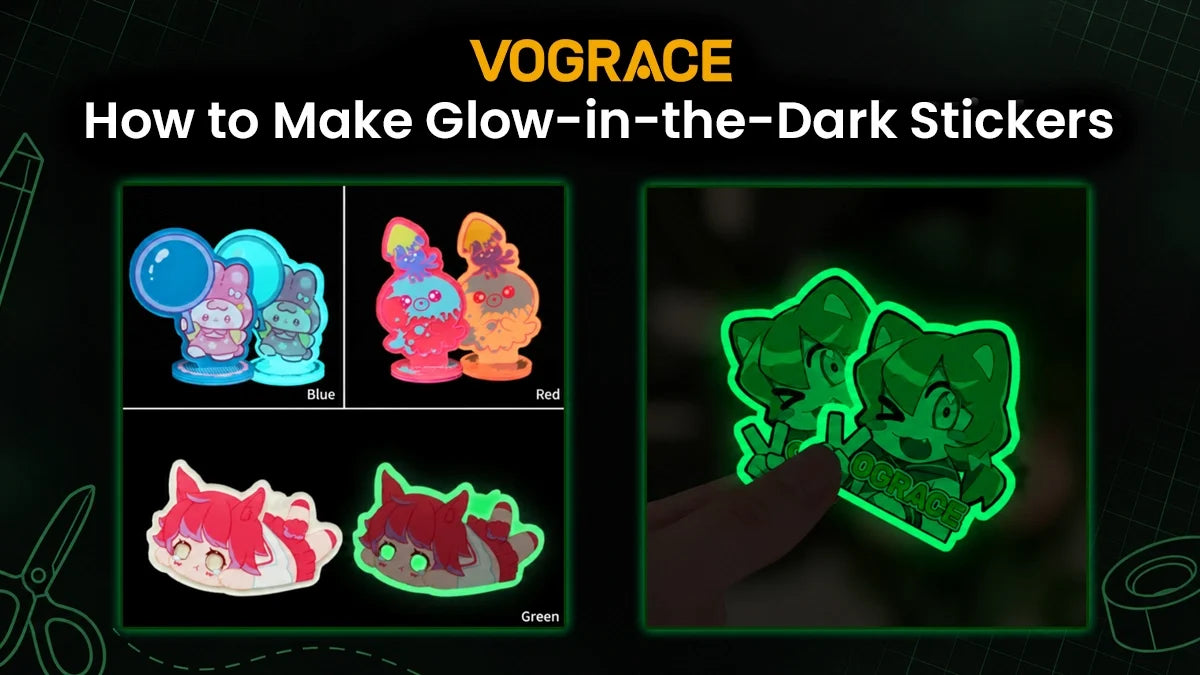
These sticker papers are made with a glowing material that soaks up light while the lights are on. When the room gets dark, the material lets out a soft green glow. The best part about these sticker papers is that they are printable and already come with a sticky backing. So all you need to do is print your design on it and cut it out. Then peel the backing paper and stick it like a normal sticker.
Before you learn how to make them, it's important to know a few things.
First, the sheet has a pale green tint in normal light. This means your colors may look slightly greener after printing, and white turns light green.
Second, the ink sits on top of the glowing layer. Dark colors block the glow, while light colors and unprinted areas allow the sticker to shine.
Keep both of these points in mind throughout this DIY project.
Materials You'll Need
● Printable glow-in-the-dark sticker paper
● Inkjet printer
● Scissors or a cutting machine
Buy sticker paper that is suitable for your printer. Many glow sheets are made for inkjet printers only. Laser printers are simply not a good match for this project. Make sure to read the label, because it tells you everything you need to know about the sheets. If you have a cutting machine, get a sheet that supports the print and cut feature.
How to Make Glow-in-the-Dark Stickers in the Easiest Way
Start with a design. Pick a simple image with bold shapes and light colors. For beginners, something like a star, a cartoon alien, a UFO, or a cute ghost works best.
Open the design on your computer and resize it to the sticker size you want. If you're making a layout full of designs, leave a little space between each one so cutting is easy.
Next, print a test on plain paper to check your size and spacing. Keep in mind that the colors you see on plain paper will not match those on glow-in-the-dark sticker paper.
Then load the glow sheet. These sheets are thick and stiff, so use the rear paper tray if your printer has one. Make sure the printable side faces the right way. After that, print your design. Wait for the ink to dry completely before proceeding to the next step.
Now, it's time to cut. If you're using a cutting machine, use the print and cut feature so it follows your outline. It's a good idea to run a small test cut on a corner before committing to the whole sheet.
If you don't have a machine, cut along the outline of each design with sharp scissors and take your time.
Peel the backing paper and press your stickers onto a clean, dry surface. You can stick them on a notebook, a bedroom wall, or a ceiling, wherever you want.
Finally, hold the stickers under bright light for a few minutes, then turn off the lights and watch your stickers glow!
Tips for Making Glow-in-the-Dark Stickers at Home
The design is the most important part of these stickers. Keep your design bold and light. Thin lines and tiny details are hard to see in the dark, and heavy dark colors will block the glow. Use darker colors only in small spots.
Areas without ink will glow fully, so leave some parts unprinted. You can use this to your advantage and get creative. Think of something like an animal with glowing eyes or a character holding a light or a lamp.
Since the sheet is pale green, bright colors can look slightly off, so expect a green tint. Once again, use your creativity and pick designs like aliens, stars, and slime.
Always run a test cut if you're using a cutting machine. These sticker papers are thick and harder to cut than normal sticker papers. So a few test runs before committing to the whole sheet can save both time and money.
Charge your stickers well under sunlight or a bright lamp, then use them indoors. A UV flashlight works even better for charging your glow-in-the-dark stickers. Keep the stickers away from rain and outdoor wear.
Different brands glow in slightly different shades, with green to greenish yellow being the most common. So try different packs and pick the one you really like.
But if you don't have a printer or a cutting machine, or if you want glow-in-the-dark stickers with your own design in professional quality, here's how you can get them!
Explore Custom Glow-in-the-Dark Stickers by Vograce
 If you want to skip the hassle of DIY, or if you need a big batch of stickers with a professional finish and consistency, we can turn your artwork into custom glow in the dark stickers.
We offer stickers in various sizes. Our MOQ starts at just 1 set (10 stickers) per design. All you need to do is get your design ready and upload it. Then check the preview in our online editor, select the size and quantity, and place your order.
You will receive stickers made with professional equipment and with the cleanest finish, delivered right to your doorstep. This way, you don't have to worry about making the stickers yourself and can focus completely on the designing part.