Sticker Sheet Size Guide: Standard Dimensions & Layout Tips
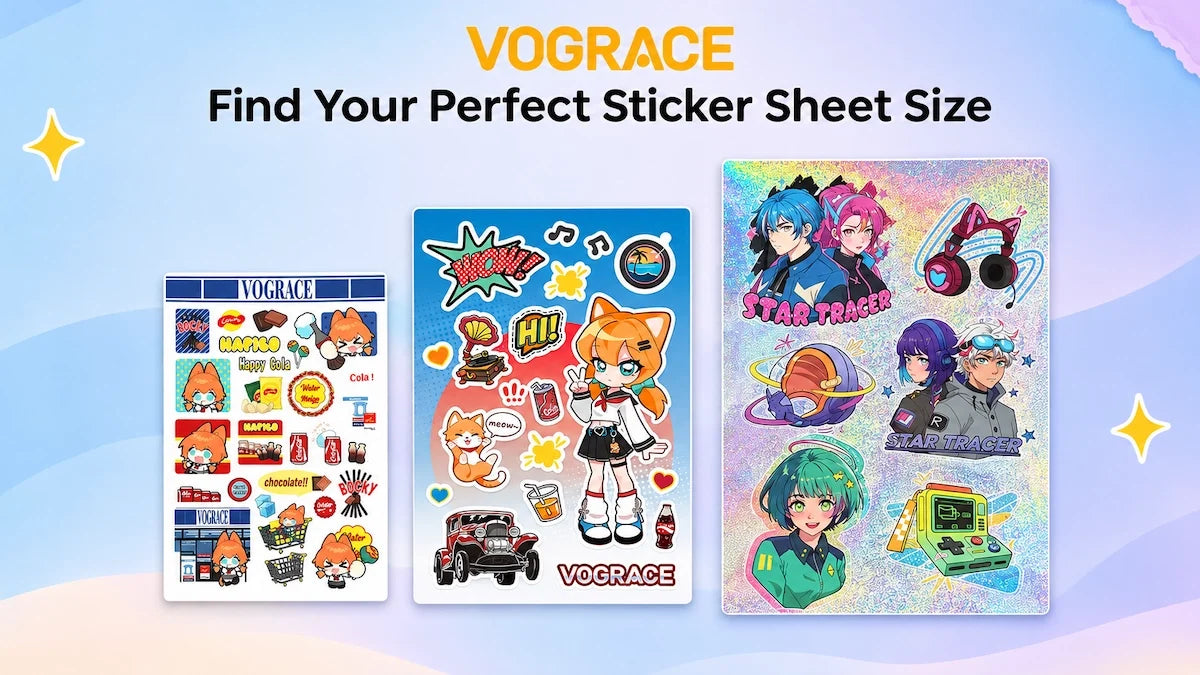
A sticker sheet can be small enough to tuck into a planner or large enough to hold dozens of labels. The tricky part is that “sticker sheet size” can refer to the whole backing sheet, the individual peel-off stickers, or the printable area available inside the edges. Those are three different measurements.
If you are making stickers for yourself, planning a small shop collection, or sending artwork to a printer, this guide brings the common sizes together in inches, millimeters, and pixels—and shows how to use that space without squeezing your designs.
What Is the Standard Sticker Sheet Size?
There is no single universal standard for sticker sheets. In the US, 4 × 6 in and 5 × 7 in are familiar compact formats, while 8.5 × 11 in (US Letter) is useful for printing at home. Many international printers and stationery sellers use ISO A-series sizes such as A6, A5, and A4. Some companies also offer 6 × 8 in sheets, squares, or fully custom dimensions.
For a quick starting point: choose 4 × 6 in or A6 for a small sticker set, 5 × 7 in or A5 when you need more room, and US Letter or A4 when you want a larger printable sheet. These are practical options, not mandatory industry sizes.
Sticker Sheet Size Chart: Inches, Millimeters & Uses
The measurements below describe the finished outer sheet, not each removable sticker. Formats such as 4 × 6 in are common commercial choices; A7–A4 and US Letter are established paper dimensions. Availability depends on the printer.
|
Sheet size |
Dimensions (in) |
Dimensions (mm) |
Typical use |
|
3 × 4 in |
3 × 4 |
76.2 × 101.6 |
Mini sticker sets, small inserts |
|
4 × 4 in |
4 × 4 |
101.6 × 101.6 |
Compact square collections |
|
4 × 6 in |
4 × 6 |
101.6 × 152.4 |
Small art sets, planner stickers |
|
5 × 7 in |
5 × 7 |
127 × 177.8 |
Mixed designs, shop merchandise |
|
6 × 8 in |
6 × 8 |
152.4 × 203.2 |
Larger themed sticker sets |
|
8 × 10 in |
8 × 10 |
203.2 × 254 |
Large layouts, many designs |
|
US Letter |
8.5 × 11 |
215.9 × 279.4 |
Home printing, labels and layouts |
|
A7 |
2.91 × 4.13 |
74 × 105 |
Very small stationery sheets |
|
A6 |
4.13 × 5.83 |
105 × 148 |
Pocket-size and planner sets |
|
A5 |
5.83 × 8.27 |
148 × 210 |
Everyday sticker collections |
|
A4 |
8.27 × 11.69 |
210 × 297 |
Full-page printing, larger sheets |
|
A3 |
11.69 × 16.54 |
297 × 420 |
Large-format printing, if supported |
Inch figures for ISO sizes are rounded to two decimals. A-series measurements in millimeters are exact nominal paper sizes. Not every sticker vendor offers every format.
US Sizes vs. A-Series Paper Sizes
The two size systems overlap in everyday use, but they are not interchangeable. A6 (105 × 148 mm) is close to 4 × 6 in (101.6 × 152.4 mm), yet it is a little wider and shorter. A5 (148 × 210 mm) is noticeably larger than 5 × 7 in (127 × 177.8 mm). A4 is narrower and taller than US Letter.
That difference matters when you use a template, buy protective sleeves, prepare packaging, or print without scaling. Set the document to the exact finished size you ordered instead of picking the “closest” paper preset.
Which Sticker Sheet Size Should You Choose?
Start with where the sheet will go. A sticker pack that needs to fit inside a parcel insert has different limits from a sheet made for your desk or an art-market display.
|
What you are making |
Useful starting sizes |
Why they work |
|
Planner or journal stickers |
A7, A6, 4 × 6 in |
Easy to store; works for many small icons |
|
Illustration or character sets |
4 × 6, 5 × 7 in, A5 |
Room for several medium designs |
|
Small-business packaging |
4 × 6 in, A5, US Letter |
Choose by label count and cutting setup |
|
Kids’ activity or reward stickers |
5 × 7 in, A5, A4 |
More usable space for repeated motifs |
|
Artist-alley / market merchandise |
4 × 6, 5 × 7 in, A5 |
Compact to display, pack and carry |
|
Home printer sticker paper |
US Letter or A4 |
Matches commonly sold printable sheets |
For merchandise, check the sleeve or backing card before finalizing the artwork. A smaller sheet with comfortable spacing often looks better than a larger sheet crowded with tiny pieces.

How Big Should the Individual Stickers Be?
A sheet’s outer dimensions are only half the decision. The size of each peel-off sticker controls how much detail it can carry and how easily it can be used. These are design ranges, not cutting-machine minimums.
|
Individual sticker size |
Good for |
Design watch-out |
|
0.25–0.5 in (6–13 mm) |
Tiny planner marks and simple dots |
Avoid lettering and fine illustration |
|
0.5–1 in (13–25 mm) |
Icons, checklists, small seals |
Check readability at print size |
|
1–2 in (25–51 mm) |
Characters, labels, small logos |
A versatile size for mixed sheets |
|
2–3 in (51–76 mm) |
Larger artwork or focal designs |
Fewer will fit on compact sheets |
|
Over 3 in (76 mm+) |
Statement art and larger decals |
Use a larger sheet or fewer pieces |
An illustration that looks crisp on a monitor can turn into a blur at half an inch. Before you commit, print one design at its real size. If you are choosing sizes for individual stickers rather than a multi-design sheet, our sticker size chart and guide covers that broader decision.
How Many Stickers Fit on One Sheet?
There is no fixed sticker count for a given sheet size. It changes with the individual sticker dimensions, margins, spacing, and cut shape. A design with many narrow details can need more breathing room than a tidy grid of squares.
Worked Example: 30 mm Square Stickers
To make the comparison fair, imagine every sheet holds 30 × 30 mm square stickers, with a 5 mm margin on each side and a 3 mm gap between stickers. The table below shows how many fit in a simple rectangular grid, before allowing for a brand header, registration marks, bleed or other production restrictions.
|
Sheet |
Columns × rows |
Illustrative total |
|
A7 (74 × 105 mm) |
2 × 2 |
4 |
|
4 × 6 in (101.6 × 152.4 mm) |
2 × 4 |
8 |
|
A6 (105 × 148 mm) |
2 × 4 |
8 |
|
5 × 7 in (127 × 177.8 mm) |
3 × 5 |
15 |
|
6 × 8 in (152.4 × 203.2 mm) |
4 × 5 |
20 |
|
A5 (148 × 210 mm) |
4 × 6 |
24 |
|
US Letter (215.9 × 279.4 mm) |
6 × 8 |
48 |
|
A4 (210 × 297 mm) |
6 × 8 |
48 |
Illustrative geometry only—not a guaranteed printable quantity or a Vograce manufacturing specification. Actual cut-line spacing and edge requirements differ by vendor, material and equipment.
A Quick Way to Estimate Your Layout
For evenly sized square or rectangular stickers, subtract the left and right margins from the sheet width. Then divide the usable width—plus one gap—by the sticker width plus the gap; round down. Repeat for the height. Multiply the number of columns by rows. This is a planning shortcut, not a substitute for your printer’s template.
For example, a 4 × 6 in sheet is about 102 × 152 mm. With the measurements used above, it fits two 30 mm squares across and four down: eight in total. If the printer requires a wider separation, that count may drop. Mixed-size designs must be arranged individually rather than calculated as a single grid.

Sticker Sheet Layout Tips That Actually Matter
1. Leave Space for Cutting and Peeling
The empty area between stickers is functional, not wasted space. It separates cut paths, leaves room for tolerances and helps people peel one design without lifting its neighbor. Some professional printers ask for only a few millimeters between cut lines; others require considerably more. Do not adopt a number from another brand’s template as a universal rule.
2. Understand Bleed, Cut Lines and Safe Areas
These three boundaries serve different jobs:
· Bleed: artwork extended beyond the cut line when color should run to the edge, preventing tiny unprinted slivers if cutting shifts.
· Cut line: the finished outline of an individual sticker. On a kiss-cut sheet, the backing remains intact.
· Safe area: space inside that cut line reserved for text, faces, logos and other details that must not be trimmed.
As a reality check, published supplier requirements vary substantially: StickerApp specifies 2 mm of bleed and spacing, while Stomp Stickers asks for 3/16 in (about 4.8 mm) between kiss cuts. Always follow the requirements of the service you use, including any separate outer-sheet trim bleed.
3. Build the Sheet Around the Biggest Design
Put the largest illustration in first, then arrange smaller pieces around it. Keep a deliberate rhythm instead of filling every corner. A few generous gaps can make the sheet look more finished—and help customers find each sticker.
4. Decide Whether the Background Is Part of the Design
A printed background, title or tiny brand mark can make the sheet feel like a complete collection. But the background should remain separate from the individual peel-off artwork in your design file when your printer asks for distinct layers. Keep essential text away from sheet edges and cut paths.
5. Match the Layout to the Cutting Method
Kiss-cut sticker sheets keep multiple removable designs on one backing sheet; die-cut stickers are separated all the way through the liner. The outer sheet can be cut to shape as well, depending on the manufacturer. For a hands-on explanation of the process, see our guide to making sticker sheets.
Sticker Sheet Pixel Sizes at 300 PPI
If you work in Procreate, Photoshop, Canva or another design app, pixels matter just as much as inches. At 300 pixels per inch (PPI), each inch of finished print needs 300 pixels. “300 DPI” is often used as shorthand in printer artwork instructions, although DPI technically describes printer output rather than image pixel density.
|
Finished sheet |
Canvas at 300 PPI |
Notes |
|
4 × 6 in |
1200 × 1800 px |
Before extra bleed |
|
5 × 7 in |
1500 × 2100 px |
Before extra bleed |
|
6 × 8 in |
1800 × 2400 px |
Before extra bleed |
|
US Letter |
2550 × 3300 px |
Before extra bleed |
|
A6 |
1240 × 1748 px |
Rounded to whole pixels |
|
A5 |
1748 × 2480 px |
Rounded to whole pixels |
|
A4 |
2480 × 3508 px |
Rounded to whole pixels |
These are nominal pixel dimensions for the finished sheet only. If bleed is required, the artwork file may need to be larger. Follow the exact template or working dimensions supplied by your print provider.
To work out any other size: pixels = inches × 300. For millimeters, pixels = millimeters ÷ 25.4 × 300. Do not enlarge a small web image and assume the extra pixels create detail. The original artwork needs enough resolution at the final printed size.
Home Printing vs. Ordering Professionally
Printing at home? US Letter and A4 sticker paper are widely available. Make sure the paper matches your printer and design app. A desktop printer may leave unprintable edges, while a cutting machine’s print-then-cut registration marks reduce the usable area further. The usable cut region can be much smaller than the sheet itself; check the current limits in your machine’s software.
If you are ordering from a print shop, you can choose a finished sheet size that suits the product instead of building around a home-paper format. Ask for the provider’s sheet template, allowed sticker sizes, margin and gap rules, file type and proof process. Our print-ready artwork guide explains the larger picture of resolution, bleed and artwork setup.
Common Sticker Sheet Sizing Mistakes
· Using the whole paper as the sticker area and leaving no room for the printer or cutter.
· Confusing sheet dimensions with the finished dimensions of one peel-off sticker.
· Treating A6 and 4 × 6 in—or A4 and US Letter—as exact substitutes.
· Counting stickers from a neat mockup without accounting for cut lines, margins and bleed.
· Shrinking detailed artwork until text, eyes or tiny shapes become hard to recognize.
· Sending a 300-PPI sheet file without checking whether bleed is included in that canvas size.
Custom Sticker Sheets at Vograce

Once you have a size and layout in mind, you can turn the artwork into a finished sheet with Vograce custom kiss-cut sticker sheets. The collection includes standard custom sheets and an ISO-paper-size option, with materials and finishes such as vinyl, clear, holographic and glitter across eligible listings. You can combine multiple designs on one backing sheet and choose the format that works for your artwork.
One important detail: do not use the example spacing in this guide as your production template. Vograce’s sticker-sheet product pages and general FAQ do not describe every spacing case identically, and specialized finishes can have their own limitations. Check the selected product’s current artwork requirements and confirm any unusual layout before you order.
Sticker Sheet Size FAQs
Is 4 × 6 inches a standard sticker sheet size?
It is a common small-sheet format, particularly for illustrated sets and planner stickers, but there is no universal sticker-sheet standard. A6 is another popular compact option and is slightly different in size.
Is A5 the same as a 5 × 7 inch sticker sheet?
No. A5 measures 148 × 210 mm (about 5.83 × 8.27 in); a 5 × 7 in sheet measures 127 × 177.8 mm. An A5 template will not fit a 5 × 7 in sheet without redesigning or scaling.
What size sticker sheet is best for a planner?
A6 or 4 × 6 in is a good place to start for a small planner sticker set. A5 gives you more space for weekly kits, headers and decorative pieces. Check the size of the individual planner boxes before finalizing the stickers.
How many stickers can fit on an A4 sheet?
It depends on the individual shapes and your printer’s required margins. In the illustrative 30 mm-square example above, an A4 sheet fits 48 stickers with 5 mm outer margins and 3 mm gaps. That is not a universal production capacity.
Do sticker sheets need bleed?
Full-bleed artwork needs extra image area past its intended cut line; the amount depends on the printer. Designs that intentionally keep a white border may use a different setup. A separate bleed may also be needed around the outer sheet.
Can a sticker sheet contain different sticker sizes and shapes?
Yes. Mixing larger illustrations with smaller icons is one of the strengths of a kiss-cut sheet. Just check the minimum sticker size, individual cut paths, spacing and maximum finished sheet dimensions with your supplier.
The best sticker sheet size is the one that gives your artwork room to be seen, cut and used. Pick the outer sheet for its purpose, size each removable sticker for real-world readability, then follow the printer’s template before production.